

CONTEXT
PROBLEM
RESEARCH
PROCESS
SOLUTION
IMPACT
REFLECTION
CONTEXT
Assigning Jobs through Agency Network
MY ROLE
Senior Product Designer
TEAM
Product Manager, Tech Lead, QA
TOOLS
Figma, User-Interviews, Questionnaires, Hotjar
Agency Network is a part of the Jitjatjo platform that enables recruitment agencies to view available jobs and assign candidates from their talent pool. This feature was designed to serve external agency clients, distinct from internal admin tools like Dash, and required a workflow that clearly displays job details, requirements, and assignment actions.
My Role: I was the lead designer working closely with the Product Manager, front-end and back-end developers, as well as direct input from recruitment agencies.
CONTEXT
PROBLEM
RESEARCH
PROCESS
SOLUTION
IMPACT
REFLECTION
PROBLEM
A gap in the market
Recruitment agencies needed a better digital experience for finding and assigning talent to jobs. Before this solution, many were still using paper trails or manual processes. The design challenge was to present a comprehensive list of jobs, detailed job information, and a seamless way to assign workers, while reducing cognitive overload and accommodating the varying job requirements.
Job details scattered across emails, PDFs, and spreadsheets.
Inconsistent ways of tracking who was assigned where.
Difficulty matching suitable workers to job requirements (skills, accreditations, availability).
We needed to create a clean, structured experience to:
View jobs at a glance.
Assign talent quickly and accurately.
Drill into job requirements.
CONTEXT
PROBLEM
RESEARCH
PROCESS
SOLUTION
IMPACT
REFLECTION
RESEARCH & INSIGHTS
The team conducted customer interviews with recruitment agencies to identify their workflows, tools they were currently using, and pain points. This helped define a hierarchy of information and critical tasks during the assigning process.
Recruiter interviews to understand workflows, pain points, and where information was missing or overwhelming.
Through this research period, I uncovered the following key insights:
Ability to “scan” jobs without reading everything.
Fast, filterable worker selection.
Seeing progress (what’s filled, what’s outstanding).
Ensuring candidates met accreditation and compliance requirements.
CONTEXT
PROBLEM
RESEARCH
PROCESS
SOLUTION
IMPACT
REFLECTION
PROCESS
Iterative Design Methodology
A “release, test, iterate” approach was adopted: prototypes were put in front of users frequently to gather feedback and refine quickly.

Flow Definition
The key steps in the user journey emerged as:
Job list page: View all jobs with summary info.
Job details page: Show full job requirements.
Assign worker page: Select or filter candidates to assign.
Edge case handling: Create a new worker on the fly if not in the system.

Feedback & Testing
Given the startup context, feedback cycles were dynamic and sometimes informal. Tools like Intercom were used to collect and organise user comments and improve the design.
Prototyping
High-fidelity Figma prototypes were built so that stakeholders and developers could clearly understand the flow and expected interactions.
CONTEXT
PROBLEM
RESEARCH
PROCESS
SOLUTION
IMPACT
REFLECTION
SOLUTION
The final design delivered clear, structured views and interactions.

Job list page
Job Details List Page: Focused on key recruiter needs like fulfillment progress and existing assignments — balancing rich details with clarity.

Job details page
Job Status Bar
A quick reference summary of the job and recruitment status.
Job Pricing Details
A heavily requested feature giving complete clarity about pricing for the entire job – including individual position breakdowns and catering for additional payouts such as bonuses, travel stipends and priority booking fees.
Position Details
The ability to view the number of positions and pricing details for each position and individual workers – noting that the cost may change between workers should overtime, split shifts or tips be included in the cost breakdown, despite the overall position being the same.
Accreditation’s
Information about any specific accreditation that may be required for the job or a particular shift.
Logs
Allowing for complete transparency of the job’s evolution. Essentially a ‘cover our asses’ area to note any issues or discrepancies over the course of the job.
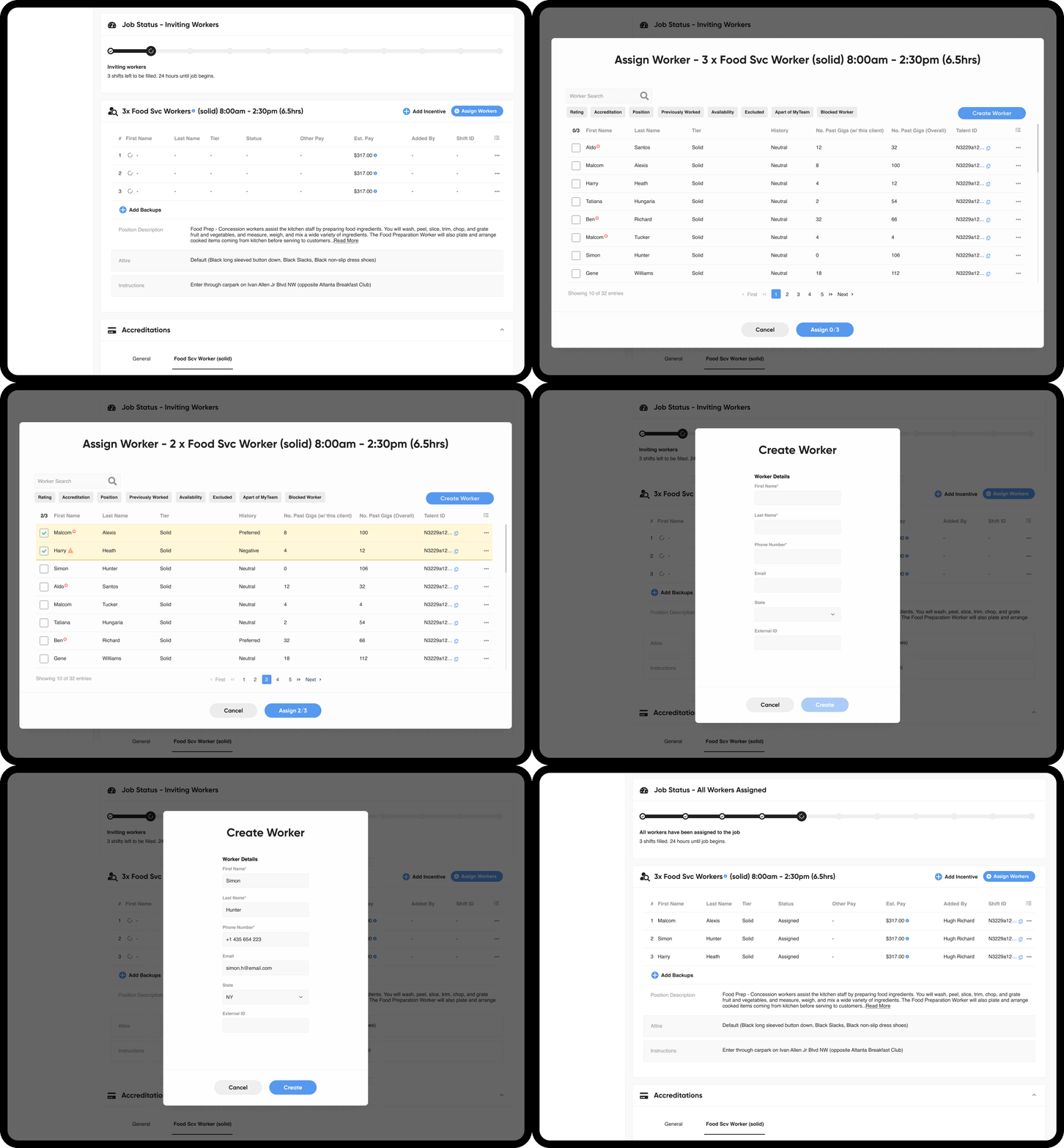
Assigning Workers
The assign workers modal was simple enough. Allowing clients to search for individual workers or filter by specific requirements was positively received, as was the ability to view a historic details on individual workers.
It also became apparent to integrated the ability to create a worker directly within in this section instead of any need to back out and create a worker elsewhere.
CONTEXT
PROBLEM
RESEARCH
PROCESS
SOLUTION
IMPACT
REFLECTION
IMPACT
Agency Network was well-received in the market. Key outcomes within the first few months included:
38
recruitment agencies onboarded
1,050
new workers added
300+
jobs worked monthly
Many clients noted that the product solved a long-standing need, replacing paper-based and manual systems with a digital workflow they hadn’t seen before.
CONTEXT
PROBLEM
RESEARCH
PROCESS
SOLUTION
IMPACT
REFLECTION
REFLECTION
The feature’s success highlights the value of:
User research with external clients, especially in niche workflows like agency recruitment.
Fast iteration and prototyping to balance speed and usability.
Catering to real-world edge cases (like creating workers mid-flow) which significantly improved usability.
Overall, the project demonstrated how targeted UX design paired with agile feedback cycles can transform complex operational tasks into a structured, usable product.